
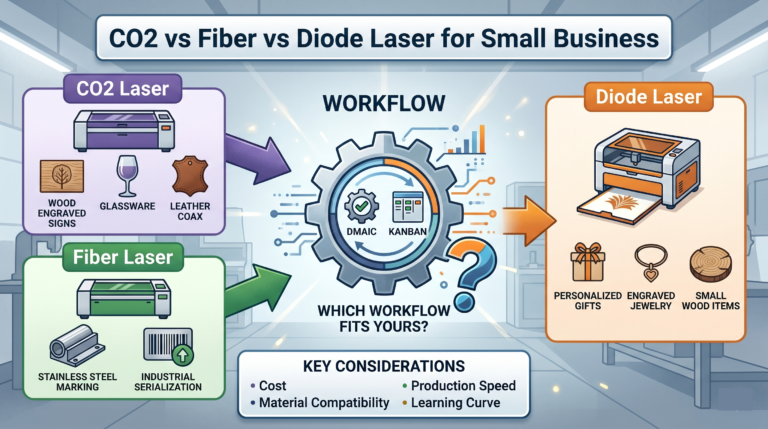
If you’re shopping for your first laser or trying to replace a machine you’ve outgrown, the biggest mistake is buying based on wattage, speed claims, or what looks popular on YouTube.
For a small business, the better question is simpler: what do you actually make, what materials do you touch every week, and what kind of workflow can your business support without creating bottlenecks?
That’s where the CO2 vs fiber vs diode decision really gets made.
Each laser type has strengths, weaknesses, and a different sweet spot. None of them is the “best” laser in general. The right one depends on your products, how often you need to switch materials, how precise your marking needs to be, how much setup complexity you can tolerate, and whether your business earns money from customization, batch production, or one-off creative work.
This guide is built for real small-business buyers, not lab testing. We’ll look at what each laser type is good at, where it struggles, and how to match it to your products and workflow without overspending or boxing yourself into the wrong machine.
If you’re still earlier in the decision process and aren’t even sure a laser is the right first category, start with What Machine Should You Buy First for a Side Hustle?. If you need a broader foundation on laser ownership before comparing types, Laticy’s Beginner’s Guide to Laser Machines, What You Need to Know Before You Invest is the better first stop.
The short answer
If you want the fastest shortcut:
- Choose a CO2 laser if you mainly cut and engrave wood, acrylic, leather, paper, rubber, fabric, and other non-metal materials.
- Choose a fiber laser if you mainly mark, engrave, or anneal metal, especially for tools, tags, jewelry, parts, barcodes, and deep marking work.
- Choose a diode laser if you need a lower-cost entry point for lighter-duty engraving and some cutting on wood, coated metals, leather, and similar materials, and you’re comfortable with a slower workflow.
That’s the simple version. The real buying decision needs a little more nuance, especially if your shop sells multiple product types.
Start with products, not machine type
Before comparing specs, write down the products that actually drive your revenue or the products you want to launch in the next 6 to 12 months.
For example:
- Personalized tumblers and coated drinkware
- Wood signs and layered decor
- Acrylic keychains and display pieces
- Pet tags and serialized metal tags
- Jewelry engraving
- Leather patches and wallets
- Packaging inserts or branded wood boxes
- Industrial parts marking or QR code marking
Once you look at the product list, the laser choice usually gets clearer.
A machine is a production tool, not a hobby collectible. If 80 percent of your orders are wood signs and acrylic name plates, a fiber laser isn’t the right first purchase even if it looks more “professional.” If your business revolves around metal tags, rings, or permanent marks on tools, a diode or CO2 laser won’t be the right core machine even if it saves money up front.
What a CO2 laser is best at
CO2 lasers are the workhorse choice for many product-based small businesses because they handle a wide range of non-metal materials and can both cut and engrave effectively.
Best fits for CO2 lasers
A CO2 laser is usually the strongest fit if your business sells:
- Wood signs, ornaments, layered crafts, and gift items
- Acrylic signs, keychains, display parts, and branding pieces
- Leather patches, notebooks, wallets, and accessories
- Rubber stamps
- Paper goods, packaging inserts, and cardstock prototypes
- Fabric and felt craft products
- Personalized home decor and wedding items
Where CO2 shines in a business workflow
CO2 lasers make sense when your workflow includes both cutting and engraving on the same machine. That matters more than many buyers realize.
If you’re building finished products out of sheets of wood or acrylic, a CO2 machine can often cover both core steps in one setup. That means fewer handoffs, fewer machines, and less friction in production.
For small shops, that kind of flexibility can matter more than raw speed on paper.
CO2 limitations to keep in mind
CO2 isn’t the best general solution for bare metal engraving. It can mark some metals with sprays or coatings, but if metal is central to your product line, that workaround usually becomes a weak point in production.
CO2 machines also require attention to:
- Ventilation and fume management
- Lens and mirror cleaning
- Alignment on some machine styles
- Cooling systems on many setups
- More footprint than many diode or galvo fiber systems
Those aren’t deal breakers. They just mean a CO2 laser is a better fit for a business that’s ready for a more complete production setup.
What a fiber laser is best at
Fiber lasers are built for metal marking and engraving. If your business value comes from clean, fast, durable marks on metal, a fiber machine is usually the correct answer.
Best fits for fiber lasers
A fiber laser is usually the strongest fit if your business sells or marks:
- Stainless steel, aluminum, brass, copper, and titanium items
- Jewelry, rings, pendants, and watches
- Tools and branded metal accessories
- Firearm-safe compliant marking where legally applicable and properly handled
- Serialized plates, asset tags, and industrial labels
- Barcodes, QR codes, and traceability marks
- Anodized or coated metal products
- Deep engraved logos or permanent ID marks on metal parts
Where fiber shines in a business workflow
Fiber lasers are strong when precision, permanence, and speed matter more than material variety.
If you run a business that gets repeat jobs for the same type of metal parts, tags, or accessories, fiber can be extremely efficient. A galvo-based fiber machine can move quickly, repeat accurately, and handle fine detail better than many buyers expect.
That makes fiber a natural fit for:
- Batch personalization
- Small industrial or B2B work
- High-value, small-format products
- Detailed metal logo work
- Fine text and code marking
If your customers care about long-lasting marks that don’t peel, wash off, or wear away easily, fiber is often the right tool.
Fiber limitations to keep in mind
The biggest limitation is simple: fiber isn’t your all-purpose cut-and-craft machine.
If your catalog depends on cutting wood, acrylic, paper, or leather at volume, fiber is the wrong primary tool. It’s specialized. That specialization is exactly why it performs so well on metal, but it also means some businesses overbuy it before they’re ready.
Fiber systems can also feel less intuitive for buyers coming from hobby craft equipment. Depending on the machine, setup, rotary use, and software workflow may take more adjustment. For many businesses, the learning curve is worth it. But it’s still a factor.
What a diode laser is best at
Diode lasers are often the gateway into laser business ownership because they usually cost less up front and can handle a useful range of beginner-friendly engraving tasks.
They’re especially common with solo makers, Etsy sellers, home-based businesses, and early-stage side hustles.
That also makes this section one of the cleaner monetization points in the article. If a reader clearly fits a lower-cost entry path, it’s reasonable to route them toward a budget-focused roundup like The Best Budget Laser Engravers in 2025, Affordable Precision for Every Creator rather than forcing them into a bigger-machine conversation too early.
Best fits for diode lasers
A diode laser can be a practical fit if your business focuses on:
- Light wood engraving
- Some wood cutting, especially thinner stock
- Leather goods and patches
- Painted, coated, or anodized surfaces
- Slate, some ceramics, and select craft materials
- Early-stage product testing before investing in larger equipment
Some diode setups can also mark certain metals indirectly or work well on coated tumblers, but that’s different from saying they’re true metal production machines.
Where diode shines in a business workflow
Diode lasers work well when you need:
- A lower-risk entry point
- Small-batch customization
- Flexible experimentation
- A lighter production schedule
- A compact machine for limited space
For a business still proving demand, a diode can be a smart way to validate products before moving up to a CO2 or fiber platform.
That matters. A cheaper machine isn’t always the wrong choice if it helps you learn your market without locking up too much capital.
Diode limitations to keep in mind
The tradeoff is usually workflow speed, cut performance, and material versatility.
Compared with a good CO2 machine, a diode laser is often slower and less capable on thicker materials or production-heavy cutting jobs. Compared with a fiber laser, it isn’t the right answer for serious metal marking work.
That means diode machines are often best for businesses in one of two stages:
- Testing and learning stage, where the owner is validating products and building demand
- Supplemental stage, where the diode machine supports a broader shop rather than carrying the full business alone
If your order volume is rising and turnaround time is getting tighter, a diode laser can become the bottleneck sooner than you hoped.
Material compatibility matters more than brand loyalty
A lot of buyers get pulled into brand comparisons too early. Brand matters, but only after you’ve matched the laser type to the materials that make you money.
Here’s the practical view:
Choose CO2 if you mostly work with
- Wood
- Acrylic
- Leather
- Paper
- Rubber
- Fabric
- Many non-metal sheet materials
Choose fiber if you mostly work with
- Stainless steel
- Aluminum
- Brass
- Copper
- Precious metals
- Many other metals used for marking and engraving
Choose diode if you mostly work with
- Thin wood
- Leather
- Some coated or painted items
- Entry-level craft materials
- Early-stage product experiments
If your material list crosses both non-metals and metals in serious volume, the honest answer may be that no single laser type will do everything well enough for a growing shop.
That’s an important buying insight. Trying to force one machine to cover every future product idea often leads to frustration.
Match the laser to your business model
Two businesses can sell similar products and still need different machines because their workflows are different.
Here’s where many buying guides stop too early.
If you run a customization-heavy gift business
If your orders are mostly personalized names, dates, logos, and one-off custom requests, flexibility usually matters more than peak industrial speed.
A CO2 laser is often the better fit if those custom products are wood, acrylic, leather, or mixed craft materials.
A fiber laser is often the better fit if those custom products are metal jewelry, flasks, tags, tools, or branded accessories.
A diode laser can work if your order count is still manageable and you’re keeping overhead low, but it may strain under higher daily customization volume.
If you run a batch-production product business
If you produce the same SKUs repeatedly, workflow efficiency matters more. You want the machine that handles your main material cleanly, consistently, and with minimal babysitting.
- For non-metal batch products, CO2 often wins.
- For metal tags, parts, and repeat engraving work, fiber often wins.
- Diode usually wins only if the business is still small enough that slower output doesn’t hurt delivery times or margins.
If you’re building a home-based side business
Home-based sellers often have tighter limits around budget, noise, ventilation, and space.
That doesn’t automatically mean “buy a diode,” but it does mean you should think realistically about your setup.
A diode laser can be easier to start with financially, but slower production can cost you later.
A CO2 laser may give you stronger product capability, but only if you can support the space, ventilation, and maintenance demands.
A fiber laser may be an excellent fit if your niche is compact metal products, especially where you don’t need large cutting beds.
The best home-based machine is the one your space and workflow can actually support safely.
If you plan to grow into higher-margin products
Think about where you want your business to go, not just what you’re making this month.
If you’re starting with simple engraved wood gifts but plan to expand into acrylic signage, packaging, and layered products, CO2 may be the better long-term buy than a diode.
If you’re currently selling simple personalized items but want to move into jewelry, premium metal goods, or B2B industrial marking, fiber may be the smarter investment path.
This is where a cheap first step can sometimes become an expensive detour.
Speed isn’t just about machine specs
Small-business buyers often overfocus on top speed numbers and underfocus on total workflow speed.
The machine is only part of the job.
Your real production speed includes:
- Material loading and unloading
- Jig setup
- File prep
- Focus and alignment
- Cleanup
- Rework from mistakes
- Ventilation handling
- Switching between materials or products
For example, a machine that’s technically fast but requires constant adjustment may be worse for your business than a machine with slightly lower specs and smoother daily use.
This is another reason CO2, fiber, and diode each fit different operations.
The best choice is the machine that keeps your actual orders moving with less friction.
Cost isn’t just purchase price
A lower sticker price can still be the more expensive decision if it slows production, limits product quality, or forces an early upgrade.
When comparing CO2 vs fiber vs diode, think in layers:
Up-front cost
- Diode is often the lowest entry cost.
- CO2 usually lands in the middle, though systems vary widely.
- Fiber often has a higher up-front cost, especially for quality metal-focused setups.
Setup and support cost
Consider:
- Ventilation
- Cooling
- Rotary add-ons
- Enclosures
- Safety gear
- Software compatibility
- Workholding and jigs
- Replacement parts and maintenance
Opportunity cost
This is where the real business decision happens.
Ask:
- Will this machine let me offer the products customers are already asking for?
- Will it improve turnaround time enough to increase capacity?
- Will it reduce errors or outsourcing?
- Will it let me move into better-margin products?
A more expensive machine that matches your best products can be cheaper in the long run than a budget machine that limits your catalog.
Common buying mistakes small businesses make
1. Buying the machine that seems most versatile on social media
What looks versatile in demo videos may not be profitable in your shop. Buy for your revenue-driving use case first.
2. Choosing a machine based on future ideas instead of current demand
It’s smart to think ahead, but not at the expense of what actually pays the bills now.
3. Underestimating ventilation and safety needs
This especially affects CO2 setups, but every laser purchase should include real planning around safe operation. Until Laticy has a dedicated ventilation or laser safety page live, the most honest internal support link here’s the broader Beginner’s Guide to Laser Machines, What You Need to Know Before You Invest, then replace it later with a more specialized safety article.
4. Treating coated-metal marking as the same as true metal engraving
This is a major source of confusion. If metal is central to your business, be very clear about whether you need true metal capability or just surface marking on coatings.
5. Buying too small for a proven order volume
If your business already has traction, the cheapest machine may create more pain than savings.
Which laser fits which common small-business product categories?
Here’s a practical way to think about it.
Wood signs, layered wood decor, ornaments
Best fit: CO2
Possible budget start: Diode
If wood products are your core catalog and you need reliable cutting plus engraving, CO2 is usually the better production tool.
Acrylic signs, keychains, display pieces
Best fit: CO2
If acrylic is a core product, CO2 is usually the clear winner.
Metal business cards, tags, tools, serial plates
Best fit: Fiber
If the business value comes from durable metal marks, don’t force this category onto a diode or CO2 workaround.
Jewelry engraving
Best fit: Fiber
Especially for fine detail, permanence, and premium-looking results on metal pieces.
Leather patches, wallets, notebooks
Best fit: CO2
Possible lighter-duty option: Diode
Choose based on volume, speed needs, and whether cutting is part of the workflow.
Tumblers and coated drinkware
Depends on material and finish:
- Coated tumblers and drinkware can often fit diode or CO2 workflows depending on the setup.
- Bare metal precision marking points more toward fiber.
Rubber stamps
Best fit: CO2
This is a specialized but reliable CO2 use case.
Industrial parts marking and QR codes
Best fit: Fiber
If readability, repeatability, and permanence matter, fiber is the right direction.
When one machine is enough, and when it isn’t
For many early-stage small businesses, one laser is enough if the product line is focused.
That’s the key condition: focused.
If most of your revenue comes from one material family, choose the laser that does that material well and build your workflow around it.
But if your business truly needs both:
- strong non-metal cutting and engraving, and
- strong metal marking or engraving
then the long-term answer may be a two-machine shop.
That doesn’t mean you need to buy both at once. It means you should avoid pretending one machine will fully replace two different production strengths.
A lot of growing shops end up with a combination such as:
- CO2 for wood, acrylic, leather, and sheet-based products
- Fiber for metal personalization, tags, jewelry, and parts
A diode may still have a place as a testing, overflow, or entry machine, but not necessarily as the final backbone of the business.
A practical decision framework
If you’re still undecided, use this filter.
Buy a CO2 laser if
- Your best-selling or planned products are mostly non-metal
- You need both cutting and engraving
- You want to work with wood, acrylic, leather, rubber, or fabric
- You’re ready to manage ventilation and a more complete machine setup
- Your business benefits from product variety in non-metal materials
Buy a fiber laser if
- Metal is central to your business
- You need clean, permanent marks on metal
- You sell jewelry, tags, tools, parts, or premium metal goods
- You care about detail, repeatability, and batch efficiency
- You don’t need the machine to be your main non-metal cutter
Buy a diode laser if
- You need a lower-cost entry point
- You’re still validating demand
- Your products are lighter-duty and lower-volume
- You mainly engrave wood, leather, coated items, or simple craft materials
- You can tolerate slower output and narrower production range
Final verdict for small-business buyers
The best laser for a small business isn’t the one with the most hype. It’s the one that fits your products, materials, and daily workflow with the least friction.
Choose CO2 if you’re building around non-metal products and need serious cutting plus engraving capability.
Choose fiber if your business depends on metal marking, metal engraving, fine detail, and permanent professional results.
Choose diode if you need a lower-cost start, your workflow is lighter, and you’re still proving what your market wants.
If you buy with your real products in mind, you’re much more likely to end up with a machine that supports profit instead of creating a new bottleneck.
And if your business is already outgrowing a general-purpose starter machine, that’s usually a sign worth listening to.
The right upgrade isn’t just about more power. It’s about better fit.
Commercial next steps that fit this article
This page should support monetization, but only after the reader already understands which lane they belong in.
If Laticy is using tracked partner links with proper disclosure, the cleanest commercial placements here are:
- Buyers leaning toward a diode workflow can compare xTool, Sculpfun, and Acmer as entry-level or budget-conscious starting points.
- Buyers leaning toward a more serious CO2 workflow can start with Monport or WeCreat, depending on whether they want a broader shop upgrade path or a more home-friendly enclosed direction.
- Fiber is a real buyer lane in this article, but there’s no verified tracked fiber partner link in the current workspace. Add a vetted fiber partner link later if one is secured. Until then, it’s better to leave fiber unlinked than to force a weak commercial recommendation.
This keeps the article useful first and commercial second, which is the right tradeoff for a comparison piece like this.
[…] A laser buyer is usually thinking about marking, engraving, cutting, material compatibility, bed size, ventilation, speed, jigs, and the difference between diode, CO2, and fiber workflows. If that’s your main decision, start with a guide like Best Laser Engraver for Small Business in 2026 or the breakdown of CO2 vs fiber vs diode lasers for small business. […]
[…] still choosing which tool fits your product lane, start with the broader machine-fit thinking in CO2 vs fiber vs diode laser for small business or the premium personalization discussion around laser products that can command higher prices. The […]