
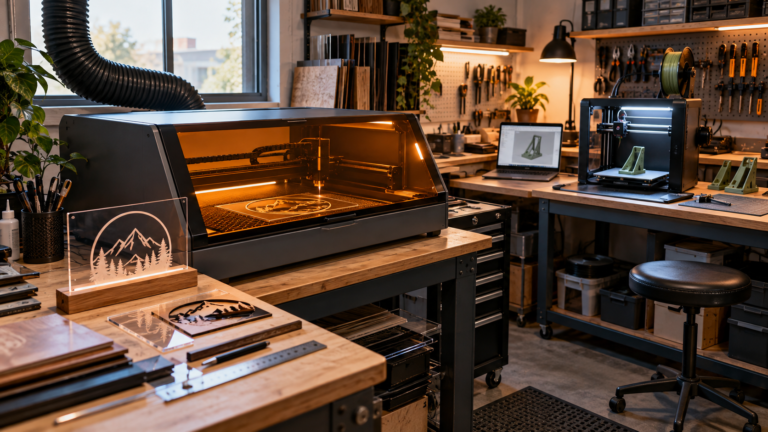
A laser job shouldn’t have to wait for a 3D print to finish. If your shop makes products with both processes, that’s the most useful way to read Bambu Lab’s R1 announcement. It isn’t really about another machine with a longer feature list. It’s about giving laser work its own slot in the schedule.
Bambu Lab announced the R1 on September 22, 2026: a standalone 55W CO2 laser cutter and engraver. Unlike the laser-equipped H2D, the R1 is its own machine, not a 3D printer that swaps between jobs. And no, it isn’t a hint at a Bambu UV printer. Cutting and engraving with a CO2 laser is a completely different process from laying down and curing ink.
If you’re weighing the Bambu R1 small business case, the opportunity is fairly specific. Your printer could keep making components while the laser handles compatible sheet parts or personalization. But buying a second machine doesn’t get you a second operator, a suitable exhaust route, or a delivery time you can actually promise.
A quick note on where this comes from: it’s operator analysis based on Bambu’s announcement and the support documentation we could access on October 2, plus independent launch coverage. We haven’t tested the R1 ourselves. The question here is what its documented design changes about running a shop, and what you’d still need to prove before customer orders depend on it.
A shared ecosystem isn’t the same as shared production capacity
Bambu says the R1 uses the same account and MakerWorld ecosystem, with laser work controlled through Bambu Suite. If you already own a Bambu printer, the front end will probably feel familiar. That doesn’t make a laser job the same thing as sending another print.
The physical separation matters more than the shared login. A hybrid machine packs several processes into one footprint. A dedicated laser lets you plan a laser station on its own terms. Our Bambu Lab H2D analysis walks through the flexibility-versus-shared-machine tradeoff. The R1 pushes the question one step further: once the machines are separate, can your shop actually use the overlap responsibly?
Picture an acrylic desk sign with a separately printed base. (This is a workflow example, not an R1 test.) With separate equipment, the base and the sign face don’t have to take turns on the same machine. The laser station can stay set up for its own process instead of waiting for a print to wrap up.
The finished sign still waits on whichever step finishes last, though, and both parts have to fit together. Keeping your artwork in one place doesn’t guarantee a revised sign face matches the right base revision. Tie the component files, material spec, and approved assembly sample to the same product version.
The independence has limits, too. Separate hardware can isolate some downtime, but you’re still sharing software, accounts, network services, power, and one busy operator. If either part is essential to the order, a stall on one side can still keep the whole thing from shipping.
Parallel production still needs someone watching
The strongest warning in the R1 documentation also happens to be one of the most relevant for a one-person business: you have to supervise it.
Bambu’s first-use guide says someone must be present during operation. The R1 safety guidelines go further and require supervision at all times, including during optical-path calibration. Take that at face value. Automation isn’t permission to walk away from a running laser.
So a sensible production plan separates machine overlap from attention overlap. Letting the printer carry on with an established job while you watch the laser is one workable arrangement. Starting the laser and then leaving to fix the printer, answer the door, or pack orders in another room is something else entirely.
Before you count any saved hours, map out the moments each station needs your hands and eyes: loading, starting, checking, unloading, cleaning, and dealing with faults. If two of those land at the same time, move one. Don’t fix a scheduling conflict by cutting corners on laser supervision.
This is where a dedicated machine can earn its keep without being a dramatic capacity jump. Fewer process changeovers can mean a calmer day and fewer queue collisions. That’s worth measuring, even if assembly, customer proofs, or finishing still set the real pace of the business.
Accessories change the safety conditions, not just the product size
The R1’s configuration options deserve more attention than the usual bundle picker.
Bambu describes standard enclosed operation as Class 1. Its announcement says plainly that adding the Riser Base or Conveyor turns the system into Class 4, intended for professional use by trained personnel. The R1 laser safety manual lists the same split: standalone unit Class 1, riser configuration Class 4. That’s not a footnote to a bigger work-area claim. It changes what kind of setup you’re running.
Treat the enclosed setup as its own approved workflow
For work that fits the standard enclosed configuration, plan around that configuration’s limits and instructions. Class 1 doesn’t mean fire, fumes, materials, or maintenance stop being risks. It’s about laser radiation protection under specified operating conditions, and it isn’t a statement that any home workshop is a suitable place for the machine.
The R1 safety guidance expects the protective enclosure to stay correctly installed, the interlocks and emergency stop to work, smoke extraction to be adequate, materials to be verified, and cooling to run normally. Those are ongoing jobs. You don’t tick them off once on delivery day.
Treat long-stock work as a separate shop decision
According to the auto-passthrough guide, that workflow needs both the Riser Base and the Conveyor. It also sets material limits and front-and-rear no-access clearances, because the stock moves back and forth through the machine. The fact that the R1 fits on your bench says nothing about whether a long board can travel safely through your room.
Before you offer long signs or anything else that depends on those accessories, have a qualified laser-safety professional assess the full configuration, and check the workplace and local rules that apply to you. That covers access control, exposure protection, training, how material moves, and fume management. Buying goggles and clearing space behind the bench isn’t the same thing.
Bambu’s CO2 safety guidance also warns that ordinary visible-light or blue-laser eyewear won’t protect you from this laser’s infrared wavelength. So don’t carry over an H2D or diode-laser safety setup by assumption. Get the right protection specified for your exact configuration, and follow the manufacturer’s current documents.
If your shop can’t support the accessory workflow, keeping your product menu inside the enclosed setup’s validated limits is a perfectly reasonable business call. You don’t have to buy every capability on offer.
Installation means building a station, not clearing a patch of bench
The R1 first-use guide covers installation, filling the cooling system, and calibration before you produce anything. The safety documentation adds checks for air assist, cooling, optics, clear airflow, and reachable emergency controls. Automatic alignment might simplify one step, but the rest of commissioning is still yours to do.
Start with a layout that includes the machine, supported stock, room to clean and service it, the computer, and the full smoke-extraction route. Confirm the electrical and environmental requirements for your specific machine in the current regional documentation before it’s installed. Measure for the purifier, ducting, and any accessory clearance, not just the bare machine.
Bambu’s first-use instructions say the exhaust hose should vent outdoors or connect to its official laser-specific purifier. The safety guidance adds that outdoor venting has to follow local regulations and shouldn’t affect the surrounding area. That still leaves you with a real site decision. Where does the exhaust actually go? Could it drift back in through a window or air intake? And what do your chosen materials require?
A purifier doesn’t make it OK to cut unknown materials, and less smell doesn’t prove every exposure is under control. The R1 guidance prohibits materials of unknown composition, along with PVC and other chlorine-containing plastics. Our laser safety and ventilation guide covers broader home-shop planning; for the machine-specific setup, the R1’s current instructions are what count.
Budget time, not just equipment. Bambu’s periodic maintenance guide covers debris removal, optics, cameras, exhaust parts, motion components, and coolant. Put the relevant tasks on your shop calendar. Automated calibration is nice, but it isn’t a promise of maintenance-free production.
The material advantage has to match a real product
Clear acrylic is a meaningful part of this launch. Bambu lists it as an R1 cutting material, which sets it apart from the transparent-acrylic limitation it describes for the H-series blue-laser modules in the R1 FAQ.
If you already make acrylic sign faces or display parts, that may matter more to you than any headline motion speed. If your business is built around bare-metal engraving, though, the R1 isn’t a stand-in for a fiber laser. Still deciding on a process? Our CO2, fiber, and diode comparison is a good place to start.
Material compatibility is only the first check. The actual sheet, coating, masking, thickness, artwork, edge finish, and assembly fit decide whether a piece is good enough to ship. A maximum cutting spec doesn’t promise that your stock will produce a finished, profitable item at that limit.
Bambu’s first-use guide specifically tells anyone using non-official materials to pick or create a material profile and test the settings before production. That’s the right way to think about it. A supported material category gets you to testing. It doesn’t get you straight to a customer deadline.
What evidence should you have before orders rely on the R1?
DEVELOP3D’s September 22 launch coverage gives an independent publication’s account of the announcement. It isn’t a long-term production test, though. Neither that coverage nor Bambu’s speed and alignment claims tell you anything about your own shop’s throughput or service experience.
A useful acceptance record is narrow enough to actually finish. Pick a real product you already understand well, rather than touring everything the laser might be able to make.
Prove the product and its repeat setup
Write down the exact stock, file revision, configuration, lens, software and firmware versions, and the settings you validated. Keep an approved sample, and define what passes: dimensions and fit, legibility, edge condition, visible residue, and any finish requirements that matter for the product.
Then run a representative batch and, later, a repeat setup. Don’t judge the machine by the best piece from your first session. Include the ordinary job changes your business deals with. If repositioning, a new sheet, or reopening a saved project changes the result, sort that out before you offer dependable repeat orders.
Measure the whole job, including your time
Time the work from prep through inspected parts. That means loading, required supervision, clearing smoke afterward, unloading, cleaning, inspection, and remakes. Count the pieces you’d actually sell, not just the pieces that came off the bed. And track your own attention separately from machine run time, so you don’t count the same minutes as free for something else.
There’s no universal batch size or payback period that settles this for every shop. Your evidence should match the order sizes and turnaround you actually plan to offer, with some slack for the variation you see.
Confirm recovery and support before promising a deadline
Know how you’ll recover an interrupted job using the documented procedures. Check that you can get the consumables and replacement parts your configuration needs, find out who handles service in your region, and read the warranty and return terms. A parts diagram is handy. It doesn’t tell you whether anything is in stock locally or how long a repair takes.
The launch announcement mentioned September pre-orders and October shipping. That doesn’t mean your unit will arrive, get installed, and pass your acceptance testing in time for a customer deadline. Confirm delivery and regional terms directly, and keep your existing production (or another proven way to fill orders) running while you learn the machine.
Frequently asked questions
Is the R1 an H2D replacement?
Not if you mean replacing its 3D printing. The R1 is a dedicated CO2 laser. For an H2D owner, it could pull laser work off the printer, but whether that’s worth it depends on real queue conflicts, materials, space, and how much operator time you have. Owning both machines doesn’t automatically make the shop faster.
Can the R1 run unattended since it has automated safety features?
No. Bambu’s R1 operating and safety guides both require someone to supervise. Sensors, interlocks, and the optional automatic fire-extinguishing accessory don’t change that. Build your schedule around it.
Should a small shop buy the Conveyor right away?
Only if a specific product needs it and your shop can support that configuration, including what Class 4 means in practice and the clearances moving stock requires. “We might make long signs someday” is a weak reason to take on a much more demanding workflow today.
A useful expansion, if your shop is ready for a second process
The R1’s most interesting promise for small shops is separation: the same familiar ecosystem, but a laser station that doesn’t tie up your printer’s production time. For an established product that uses both processes, that could remove a genuine source of waiting.
The next decision is less exciting and more important. Choose the configuration your products actually need, make sure your workspace and your schedule can support it, and validate repeat jobs before you sell the capacity. If those pieces aren’t in place yet, waiting isn’t missing out on a launch. It’s protecting the orders you already know how to deliver.