
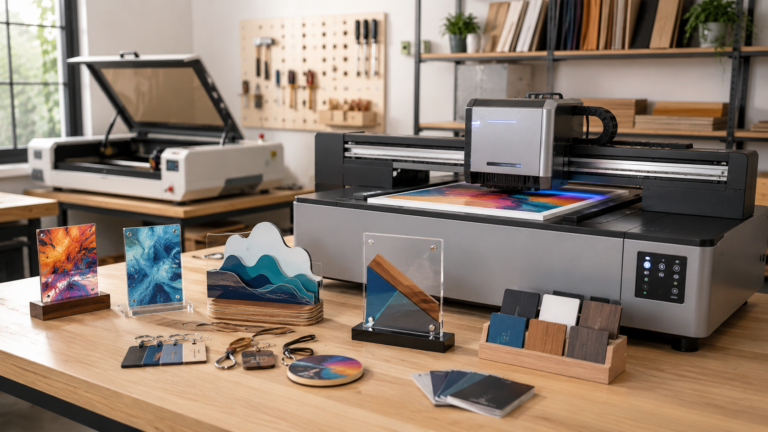
UV printers are exciting because they open up full-color product decoration, but the business case matters more than the machine. For some shops, UV printing can become its own product line. For others, it’s stronger as an add-on that complements laser engraving, cutting, and existing custom orders.
A UV printer can look like a shortcut to a better custom-product business.
Full-color designs. Acrylic signs. Branded gifts. Packaging. Drinkware transfers. Personalized products that don’t look like every engraved cutting board or tumbler on the market.
That’s the appeal.
But the machine isn’t the business model.
A UV printer only makes sense if it gives you products you can sell repeatedly, price profitably, and produce without turning every order into a troubleshooting session. For a small shop, the real question isn’t just whether UV DTF or UV flatbed printing is better. The better question is whether UV printing should be its own business line or whether it should strengthen a business you already have.
If you already run a laser business, this question matters even more. UV printing can complement laser work beautifully, but it can also become an expensive distraction if you buy it before you know what role it’s supposed to play.
If you’re still comparing specific machines, start with the broader UV printer guide here:
Best UV Printer for Small Business in 2026
This article is about the business model: what UV printing can sell, how it fits next to laser engraving, and when it’s smarter to wait.
The Short Version
UV printing can work as a standalone business when you build around products that need full-color decoration, consistent blanks, reliable production steps, and strong margins. Think acrylic signage, branded corporate gifts, packaging samples, awards, nameplates, custom promotional products, or repeatable product lines.
UV printing can also work as a strong add-on to a laser business. A laser is excellent for cutting, engraving, scoring, marking, and shaping materials. UV printing adds full color. Together, they can turn simple blanks into more finished products: layered acrylic signs, color-printed plaques, custom packaging, display pieces, ornaments, tags, event products, and branded merchandise.
The risk is buying a UV printer because the output looks exciting, then discovering that your shop doesn’t have the order flow, maintenance discipline, testing process, or pricing model to support it.
What a UV Printer Actually Adds to a Small Shop
Laser machines are strong because they’re direct and versatile. You can engrave wood, cut acrylic, mark coated metals, personalize gifts, create signage, make packaging inserts, and build physical shapes from sheet goods.
The limitation is color.
A laser can create contrast, texture, depth, and precision, but it doesn’t give you full-color graphics by itself. That’s where UV printing becomes interesting. UV printing can place full-color artwork directly on compatible surfaces, or it can create UV DTF transfers that are applied to products later.
That changes the kind of offer your shop can make. A laser business may sell engraved items. A UV-supported shop can sell branded items, full-color signs, product packaging, photo-style gifts, color logos, and mixed-material pieces that feel more retail-ready.
That doesn’t mean UV is automatically better. It means it solves a different problem.
A laser often creates the product. UV often decorates, brands, or finishes it.
When those roles are clear, the machines can work together. When they aren’t clear, the UV printer becomes another expensive tool looking for a reason to exist.
Standalone UV Printing as a Business Model
A standalone UV printing business can work, but it needs more than a printer and a list of things the printer can technically decorate.
The strongest standalone model usually has a clear product lane. For example, a shop might specialize in acrylic business signage, custom awards, short-run branded merchandise, event products, packaging samples, or personalized retail goods. The tighter the offer, the easier it’s to standardize blanks, build fixtures, test durability, photograph products, price accurately, and explain the value to customers.
The weaker version is trying to print on everything for everyone. That sounds flexible, but it can become chaotic. Every new surface needs testing. Every new blank creates alignment questions. Every customer-supplied item brings replacement risk. Every product type needs its own care expectations.
A UV printer can support variety, but variety isn’t the same as a business model.
If you want UV printing to stand alone, start by choosing the kind of customer you want to serve. A local business customer buying branded signage has a different expectation than a craft fair shopper buying a personalized keychain. A wedding client buying table signs has a different timeline than a company ordering branded gifts. A product-based business needing packaging samples has different repeat potential than a one-off custom order.
The machine is only one part of that decision. The offer, pricing, production flow, and customer type matter more.
Where UV Printing Complements a Laser Business
For many small shops, UV printing is more practical as a second layer on top of a laser business than as a completely separate business.
A laser gives you shape and structure. You can cut acrylic, wood, leather, chipboard, cardboard, and other sheet materials. You can engrave names, dates, patterns, and logos. You can make layered pieces, templates, jigs, packaging inserts, tags, ornaments, signs, and display components.
UV printing adds color and branding to those same workflows.
That combination can create products that feel more finished than laser work alone. A laser-cut acrylic sign with UV-printed color can look more like a retail product than a plain engraved panel. A laser-cut tag with a full-color logo can fit a brand package better than a simple engraved mark. A plaque can combine engraved texture with printed artwork. A custom box or insert can be cut with the laser and branded with UV print.
This is where the business case gets stronger. You aren’t asking the UV printer to invent your whole business. You’re using it to increase the value of products your shop already understands.
That can also make selling easier. Existing laser customers may already trust you for custom work. UV printing gives you a reason to offer upgraded versions, branded add-ons, color options, and more complete packages.
For broader machine-choice thinking, this guide is useful:
What Machine Should You Buy First for a Side Hustle?
Product Ideas Where Laser and UV Work Well Together
The best combined products usually use each machine for what it does well.
A laser can cut the shape cleanly. UV can print the color. The laser can engrave fine detail or personalization. UV can add logos, illustrations, patterns, or backgrounds. The laser can make a jig or fixture. UV can decorate a batch more consistently.
Examples include acrylic business signs, office nameplates, event table numbers, wedding signage, branded keychains, product display cards, retail shelf signs, ornaments, awards, packaging inserts, QR-code displays, menu signs, and small promotional pieces.
The important thing isn’t to chase every possible product. Pick a lane where the combination improves the offer. A laser-cut acrylic sign with full-color UV printing is easier to explain than “we can print on lots of stuff.” A branded product bundle for local businesses is easier to sell than a random menu of unrelated custom items.
A good combined offer might look like this: laser-cut acrylic signs for local businesses, with UV-printed logos and optional engraved names. Another might be event signage, where the laser handles shapes and stands while UV handles color artwork. Another could be retail packaging support, where the shop cuts inserts, tags, or display pieces and adds color branding.
Those are real offers. “I bought a UV printer and can print things” isn’t.
UV DTF vs UV Flatbed in This Business Context
The UV DTF versus UV flatbed decision still matters, but it should come after the business model question.
UV DTF is attractive when you need more flexibility with product shapes. If your customers want full-color logos or designs on drinkware, containers, packaging, odd-shaped items, or objects that don’t sit well in a printer, UV DTF can be useful. It can also help a shop test designs before building a more fixed production process.
The tradeoff is that transfer application becomes part of the job. Adhesion, edge lifting, surface prep, peeling, pressure, and care instructions matter. UV DTF shouldn’t be sold as magically dishwasher-safe, outdoor-safe, or scratch-proof unless you’ve tested that specific product and use case.
A more commercial UV DTF system category is discussed here:
UV flatbed or desktop UV printing is usually stronger when your products are flat or mostly flat, your blanks are consistent, and you can build repeatable fixtures. It fits acrylic signs, plaques, coasters, keychains, nameplates, phone cases, packaging panels, awards, and other products where direct printing gives you more control.
Desktop UV printers are getting more attention from small shops because they promise a smaller footprint than industrial equipment. The appeal is real, but the maintenance and testing still matter. You can read more about that category here:
For a laser business, UV flatbed printing may be especially interesting if you already cut consistent flat blanks. The laser can create the blank. The UV printer can decorate it. That gives you a cleaner production loop than constantly hunting for random objects to print on.
The Pricing Mistake to Avoid
The easiest way to fool yourself with UV printing is to price only from the blank and the ink.
That isn’t enough.
You also have to account for testing, failed prints, ruined blanks, setup time, alignment, customer messages, design revisions, packaging, care cards, cleaning supplies, maintenance, and machine downtime. If you’re combining UV with laser work, you also need to include laser time, material waste, masking, assembly, finishing, and the extra handling between machines.
This is where many small shops accidentally create a product that looks premium but behaves like a low-margin custom order. The customer sees a polished finished piece. The shop absorbs all the hidden labor.
Before turning UV printing into a product line, run the numbers on three specific products. Not categories. Products.
For example: one acrylic business sign, one branded keychain bundle, and one event table-number set. Price the materials, estimate the machine time, include setup and spoilage, and add the customer service time. Then decide whether the margin still makes sense.
Use the Product Pricing Calculator before committing to a product line:
If the numbers only work when everything goes perfectly, the product isn’t ready.
A Better Way to Test the Business
You don’t need to launch a full UV printing business on day one.
A smarter path is to test one narrow offer. If you already have a laser, pick one product that becomes better with full-color print. Build the sample. Photograph it. Price it properly. Offer it to a specific customer type.
For example, don’t start with “custom UV printed products.” Start with “full-color acrylic desk signs for local offices” or “branded event signage packages” or “laser-cut retail display tags with color logos.” Specific offers are easier to sell, easier to price, and easier to improve.
Once one offer works, build the next one. That’s how UV printing becomes part of a business instead of just another capability listed on a website.
If you don’t already have a laser business, the same rule applies. Start with one customer and one repeatable product lane. Avoid building a menu so broad that every order becomes a new experiment.
When UV Printing Isn’t the Right Move Yet
Waiting can be the right decision.
If you don’t know what products you want to sell, a UV printer won’t solve that. If your current laser products aren’t priced well, UV printing may just add more complexity to weak margins. If you don’t have space for clean workflow, ventilation, storage, supplies, and maintenance, the machine may become frustrating quickly.
It’s also worth being honest about maintenance. UV printers aren’t passive tools. Ink systems, printheads, cleaning routines, primers, films, fixtures, and surface prep all have to be managed. A laser has its own maintenance, but UV printing adds a different kind of discipline.
The better move may be to improve your existing laser offer first. Tighten your pricing. Build better product photos. Create a cleaner order process. Standardize a few best-selling products. Then add UV printing when it clearly increases the value of something that’s already working.
Final Takeaway
UV printing can be a standalone business, but it needs a focused offer, repeatable products, tested materials, and pricing that includes the real cost of production.
For many small shops, especially shops that already use a laser, UV printing may be stronger as a complementary capability. The laser creates shape, texture, structure, and personalization. UV printing adds color, branding, and a more finished retail feel.
That combination can be powerful, but only if it’s tied to products customers actually want to buy.
Before buying or expanding, choose three products you would be willing to sell repeatedly. Build the workflow on paper. Price them fully. Think through testing, spoilage, maintenance, packaging, and customer expectations. If the UV printer makes those products easier to sell at a better margin, it may belong in the business.