
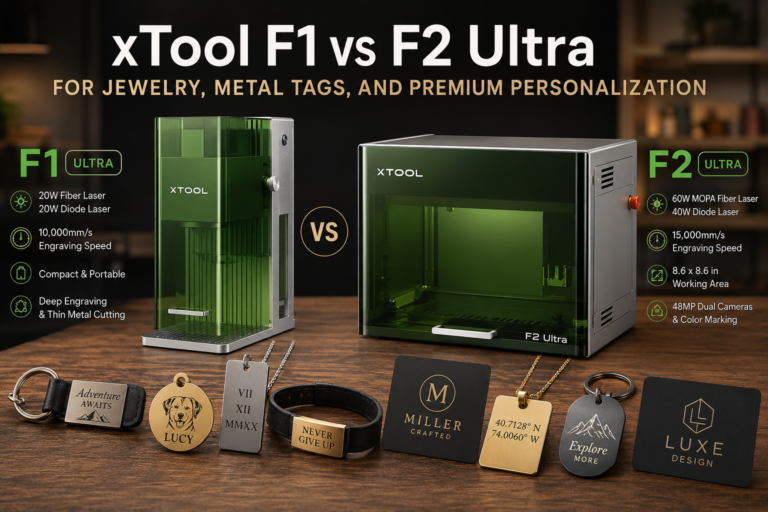
Small-format laser machines are easy to get excited about because the samples look impressive: jewelry tags, pet tags, charms, keychains, branded plates, engraved accessories, and event-ready personalization pieces.
But for a small business, the better question isn’t whether the machine can make a nice sample.
The better question is whether it supports a product line people will pay enough for.
That’s the right lens for xTool’s F1 and F2 Ultra class of machines. These aren’t the same kind of purchase as a broad CO2 machine for signs, a large-format diode setup for wood products, or a general first-machine decision. They make the most sense when the business model is built around premium small-format personalization: small objects, precise placement, fast turnaround, and higher perceived value per item.
This isn’t a hands-on review. It’s a product-fit guide based on current xTool product information and the business realities around jewelry tags, metal tags, premium add-ons, and on-demand engraving.
If you’re comparing the current xTool lineup while you read, use Laticy’s xTool link to check the latest F1, F2, and F2 Ultra options, then judge the machines against the business-fit questions below instead of buying from specs alone.
If you’re still deciding which machine category fits your shop at all, start with What Machine Should You Buy First for a Side Hustle?. This article is narrower: whether the xTool F1, F2, or F2 Ultra path makes sense for premium personalization work.
Who this machine class is really for
The F1 and F2 Ultra category is most interesting for sellers who want small custom products to feel more premium.
That might include jewelry tags and charms, pet tags, ID tags, branded metal plates, small business logo tags, wedding party gifts, engraved accessories, leather goods with metal add-ons, on-site market personalization, or small-batch branded components for other makers.
The common thread isn’t size. It’s value density.
A small engraved tag can be worth far more than its material cost if it completes a gift set, adds branding to a handmade product, or gives a customer a personalized result quickly. That’s where machines like the F1 Ultra and F2 Ultra become interesting. They aren’t only about making marks. They’re about creating premium-feeling details that can support better pricing.
They’re less compelling if your shop mostly needs large-format signage, bulk wood cutting, big acrylic projects, or general fabrication. If you need one machine to handle broad shop production, this probably shouldn’t be your first comparison point.
Why premium personalization is different from general laser engraving
A lot of laser content focuses on machine power, bed size, and material lists. Those things matter, but premium personalization has a different set of business questions.
Can you align small items accurately? Can you repeat the same placement across a batch? Can you personalize one piece quickly without wrecking the queue? Can you charge enough for the result? Can you handle names, dates, initials, logos, or short messages without turning each order into a design project?
Speed matters, but only inside a complete workflow. A fast engraver doesn’t automatically create a fast business if every order still requires awkward setup, unclear files, slow approvals, and manual positioning problems.
This is why camera alignment, small-part handling, repeatability, and product selection matter so much for this category.
If you’re still comparing laser types, Laticy’s CO2 vs Fiber vs Diode Laser for Small Business guide is the better foundation. The short version here’s that metal-heavy premium personalization pushes you toward different priorities than wood signs or acrylic décor.
xTool F1 Ultra: where it fits
The xTool F1 Ultra is positioned as a compact dual-laser machine with a 20W fiber laser and a 20W diode laser. According to xTool’s current product page, it’s aimed at deep engraving, embossing, thin metal cutting, and engraving speeds up to 10,000 mm/s.
For a small business, the F1 Ultra makes the most sense when the product line is focused and compact.
Think metal tags, branded plates, jewelry-adjacent blanks, charms, keychains, premium accessories, small leather-and-metal combinations, and short-run personalization pieces. It fits a business that values a controlled small-item workflow more than a large work area.
The business case gets stronger when you already know what you want to sell. A machine like this is easier to justify when you’ve a clear offer, such as engraved pet tags with premium packaging, branded metal tags for handmade goods, personalized charms, small business logo plates, event personalization for small accessories, or premium add-ons for gift boxes and corporate orders.
The F1 Ultra is less attractive if you’re still experimenting with every possible product category. It can make impressive samples, but a business doesn’t need unlimited samples. It needs repeatable products with enough margin to pay for the machine, materials, packaging, failed tests, and your time.
If you’re still validating whether a lower-cost laser can support your product idea, read Can a Budget Laser Engraver Actually Support a Business? before jumping into a premium setup.
xTool F2 Ultra MOPA: where it fits
The xTool F2 Ultra MOPA is the more serious metal-personalization branch in this comparison.
According to xTool’s current product page, the F2 Ultra MOPA combines a 60W MOPA laser with a 40W diode laser. xTool highlights 48MP dual cameras, metal color marking, an 8.6 × 8.6 inch working area, and engraving speeds up to 15,000 mm/s.
Those specs matter most when the business model is already leaning into premium metal work and faster small-batch production.
The F2 Ultra MOPA is the more natural fit if you want to build around metal jewelry tags, premium pet tags, stainless or brass branded pieces, color-marked metal products, small-batch corporate gifts, event engraving, or high-value add-ons for existing custom products.
The key word is “build.” A stronger machine doesn’t automatically create demand. It gives you more room to serve demand if the offer is already clear.
For example, a shop that already sells leather goods might use engraved metal tags to create a higher-end line. A gift seller might use personalized metal pieces to make wedding, memorial, or corporate products feel more premium. A market vendor might use on-demand engraving to create a reason for customers to stop, customize, and buy.
That’s different from buying the machine first and hoping the product line appears later.
Where the F2 Ultra UV variant fits
The F2 Ultra UV branch should be treated as a narrower specialty path, not the main decision for most jewelry-tag sellers.
According to xTool’s current product information, the F2 Ultra UV uses a 5W UV laser and is positioned around glass, 3D inner engraving, fine engraving, cold processing, and broader material compatibility.
That can be interesting for specialty work, especially glass or fine-detail applications where a UV laser makes more sense than the main metal-tag path. But it shouldn’t distract from the core business question in this article.
If your product plan is mostly jewelry tags, metal tags, premium metal plates, and engraved add-ons, the MOPA/fiber conversation is usually more central. If your plan is glass-heavy or specialty-material work, the UV version may deserve its own evaluation.
What about the standard xTool F2?
The standard xTool F2 may be enough for some sellers who want portable personalization without jumping straight to an Ultra-class purchase.
According to xTool’s current product page, the F2 uses a 5W IR laser and a 15W diode laser, with a 50MP smart camera and speeds up to 6,000 mm/s. xTool positions it for premium metals, plastics, wood, acrylic, leather, and portable on-site personalization.
That makes it worth considering if you’re still validating demand.
A lighter machine can be a smarter starting point when you don’t yet know whether customers will pay for the products you want to offer. The Ultra class makes more sense when you already see a path to higher-value work, faster throughput, better metal capability, or a more serious premium personalization lane.
The wrong move is buying the most advanced version because it feels safer. Sometimes it’s safer to validate the product line first.
Business cases where F1 and F2 Ultra machines make sense
This machine class makes the most sense when premium personalization is attached to a clear offer.
Jewelry tags and charms
Jewelry-related engraving can work when the products feel polished enough to command premium pricing. The machine is only part of that. The blanks, packaging, finish, photography, and brand positioning all matter.
A small engraved charm that feels like a cheap sample won’t carry the same value as one presented as part of a thoughtful gift, brand package, memorial piece, or boutique accessory.
Metal tags for handmade products
Makers who sell leather goods, bags, wallets, wood products, gift boxes, or premium accessories may be able to use engraved metal tags as a brand or upgrade element.
This can be stronger than selling tags by themselves because the engraved piece supports a larger product. A branded plate on a handmade product can make the whole item feel more finished.
Event and on-demand personalization
Portable or compact personalization can be attractive at markets, corporate events, boutiques, and pop-ups. But event engraving isn’t just “bring the machine and start selling.”
You need a narrow menu, controlled blanks, simple personalization options, clear wait times, reliable ventilation and safety planning, and a process for taking names or initials accurately. Machine speed matters, but the event workflow matters more.
Premium add-ons for existing custom orders
This may be the safest fit for many small shops.
Instead of trying to build a whole business around engraved tags, you can use premium personalization as an upsell. A custom gift box, wedding item, corporate order, memorial product, or branded package may support a metal tag, plate, or small engraved accessory at a higher margin.
That kind of add-on can increase average order value without forcing the machine to carry the entire business alone.
If you’re pricing custom work, Laticy’s guide on laser engraving custom work pricing is the right companion. Premium-looking work still needs pricing discipline.
Where this machine class doesn’t make sense
The F1 and F2 Ultra class isn’t automatically the best choice for every small shop.
It may be the wrong fit if you mainly need large signs, big décor pieces, production cutting, or broad material processing. A compact premium-personalization machine can be excellent at small, high-value work and still be a poor fit for large-format production.
It may also be too early if your product idea is untested. If you haven’t sold the kind of product you want to personalize, the machine purchase is doing too much guessing for you.
It may be overkill if the customer wouldn’t pay more for the improved mark, color, speed, or finish. Premium equipment only helps the business if the market values what it adds.
And it may disappoint if you expect desktop equipment to behave like a fully automated industrial production cell. Small-item engraving still needs fixture discipline, design cleanup, material testing, customer approval, packaging, and quality control.
Workflow matters more than spec sheets
The most important question isn’t only what the machine can mark. It’s whether the shop can turn that capability into a smooth selling process.
For jewelry tags and small metal pieces, repeatability matters. You need a way to place blanks consistently, avoid crooked personalization, catch spelling mistakes, and handle small differences between materials.
For batch work, setup matters. A machine may advertise high speed, but a slow product intake process can erase that advantage. If every item requires custom artwork cleanup, manual alignment, customer back-and-forth, and one-off packaging decisions, the bottleneck isn’t the laser.
For events, the bottleneck may be the customer line. A machine can engrave quickly and still create a bad experience if the menu is too broad, the personalization choices are unclear, or customers wait too long for a complicated design.
Before buying, sketch the full workflow:
- What exact products will you offer?
- What blanks will you stock?
- How will you hold or position them?
- What personalization options will customers choose from?
- How long does proofing or setup take?
- How will finished pieces be packaged?
- What price makes the process worth it?
If you can’t answer those questions, the machine comparison is still premature.
F1 Ultra vs F2 Ultra: a practical decision framework
The F1 Ultra is easier to understand as a focused premium-personalization machine for compact products and small-item engraving. It may fit a shop that wants a controlled metal-and-mixed-material personalization lane without immediately building around heavier throughput expectations.
The F2 Ultra MOPA makes more sense when metal work is central to the business case. If color marking, stronger metal capability, faster batch handling, and a larger small-item work area matter to the offer, the F2 Ultra MOPA is the more serious direction.
The F2 Ultra UV is more specialized. It’s worth looking at if the business case leans into glass, inner engraving, and specialty materials rather than the metal-tag and jewelry-tag path.
The standard F2 may be enough if you’re still testing whether portable personalization has demand. It isn’t always smart to start at the top of a product line before you’ve proof that customers will pay for the offer.
If you want a broader machine comparison before narrowing down, use Laticy’s Best Laser Engraver for Small Business in 2026 as a wider buyer-intent reference.
FAQ
Is the xTool F1 Ultra good for a small business?
It can be, if the business is built around small premium personalization rather than broad fabrication. It makes the most sense for focused products such as metal tags, charms, keychains, small plates, and personalized accessories where the finished item can support strong pricing.
Is the xTool F2 Ultra better for jewelry tags than the F1 Ultra?
The F2 Ultra MOPA is the more serious option if metal-heavy work, color marking, faster throughput, and premium batch workflow are central to the business. The F1 Ultra may still fit smaller or more focused personalization businesses, especially if the product line doesn’t require the F2 Ultra’s larger capability set.
Can these machines work for event engraving?
They can fit event engraving if the offer is narrow and controlled. The product menu, blanks, personalization options, safety setup, customer intake, and wait-time management matter as much as machine speed.
Should I buy an Ultra-class laser before I know what products I will sell?
Usually not. Premium equipment is easier to justify when you already have a clear product line or customer demand. If you’re still guessing, validate the offer first or consider a lower-risk starting point.
Are xTool F1 and F2 Ultra machines a replacement for a larger laser setup?
Not usually. They’re better understood as premium small-item personalization tools. They may complement a larger shop, but they aren’t the same as a large-format CO2, diode, or production cutting setup.
Final takeaway
The xTool F1 and F2 Ultra class is most interesting when premium personalization is the business model, not just an extra feature.
If you want to sell jewelry tags, metal tags, branded plates, event personalization, and small premium add-ons, these machines are worth evaluating. But the buying decision should start with the offer: what you’ll sell, how repeatable it’s, how quickly you can produce it, and whether customers will pay enough for the result.
A premium laser can make premium-looking products. It can’t make the business case for you.
[…] this is also where machine choice can matter. Laticy has already covered the difference between the xTool F1 and F2 Ultra for jewelry, metal tags, and premium personalization. That comparison is useful if you are deciding whether your current laser setup actually fits […]