
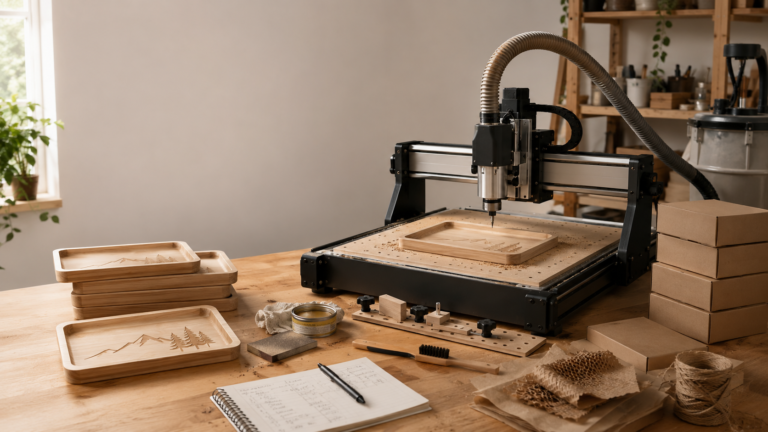
Machines are smaller. Software is more approachable. Online tutorials have gotten better. Tool libraries, presets, probing, dust collection options, and starter workflows are all easier to find now, and a seller doesn’t have to feel like a full-time machinist just to understand why a bit snapped or why a carve came out rough.
That’s good news. But it doesn’t answer the business question.
A desktop CNC getting easier to start doesn’t automatically mean it’s easier to build a profitable product line with one. The machine can be more accessible and still leave you with bottlenecks around finishing, workholding, material prep, dust, sanding, packaging, design time, and inconsistent results.
For sellers, the real question isn’t “Can I learn CNC faster than before?” It’s closer to: does the easier workflow actually help you produce sellable products repeatedly, at a margin that makes sense?
Sometimes the answer is yes. Sometimes the easier setup just makes it easier to start too many projects before you have an actual product system.
Easier is useful, but repeatable is what sells
A lot of desktop CNC marketing focuses on accessibility, and that makes sense. If a machine looks less scary, more people are willing to try it.
But a small shop doesn’t get paid for owning an accessible machine. It gets paid for finished products customers actually want to buy.
A CNC can be easy to set up and still leave you with products that take too long to sand, stain, seal, photograph, pack, and ship. A design can carve beautifully once and still be a pain to reproduce ten times with consistent quality. A file can look great on screen and still fail because the material was warped, the hold-down method was weak, or the finish ate up more labor than you budgeted for.
For sellers, strong CNC products tend to share the same traits: the design repeats without heavy one-off setup, the material is predictable enough to batch, the finish doesn’t eat the margin, the buyer gets the value at a glance, and the price covers the labor after carving.
That’s the part newer CNC owners tend to miss. The carve is only one step, and it might not even be the longest one.
For more on the production-quality side, see: CNC Bits, Feeds, and Finishes for Sellable Wood Products in 2026.
What has actually gotten easier?
Desktop CNC has genuinely improved in ways that help small sellers, and the biggest improvements aren’t always dramatic. They’re practical.
Software is less hostile than it used to be. More machines have clearer setup flows, beginner-friendly design tools and CAM workflows are easier to find, and product communities share tested settings. Some machines include better probing or guided setup. Small-format machines fit into home shops, garages, and spare rooms more easily than older industrial setups did, dust solutions and enclosures are more available, and product ideas, material sources, and workflow examples are all easier to research than they used to be.
All of that lowers the entry barrier. It also makes the business problem more visible: once the machine feels less mysterious, you have to look harder at the offer itself. Are the products repeatable? Is the finishing manageable? Can you price the full workflow? Can you deliver the same result more than once?
If the machine is easier but your products are still inconsistent, the issue probably isn’t the CNC itself. It’s more likely workholding, material selection, design complexity, finishing time, pricing, or trying to offer too much customization too early.
Easier setup does not remove finishing time
Finishing is where a lot of CNC product ideas quietly lose money.
A design might carve in twenty minutes and still need sanding, edge cleanup, stain, paint, masking removal, sealing, drying time, and a quality check. If you’re working in wood, the finish can make or break the product. A rough sign, a fuzzy edge, a blotchy stain, or an uneven seal can make something feel homemade in the bad way.
That’s why “easy CNC products to sell” can be misleading. Easy to carve isn’t the same as easy to finish. A simple tray might carve nicely but still need sanding, sealing, food-safe finish decisions, and careful photography. A layered sign can look great and still require painting, glue-up, alignment, drying time, and packaging protection. A detailed relief carve might impress other CNC owners while being a nightmare to sand efficiently.
Desktop CNC getting easier doesn’t change that math. It might get you to the finishing stage faster, but finishing still has to be priced.
If your CNC products aren’t profitable, look beyond machine time. Track how long each item actually takes once it leaves the bed.
Workholding still decides whether you can batch
Workholding isn’t the exciting part of CNC, but it’s one of the biggest filters on whether a product is worth selling.
A product that needs a new clamping puzzle every time is hard to scale. One that can be placed, held, cut, removed, and repeated consistently is a lot easier to sell.
This is where desktop CNC gets real. A machine can be easier to use and the business still has a problem if the product needs awkward hold-downs, tabs that take forever to clean up, tape that fails, clamps that get in the way of the toolpath, or warped material that shifts mid-cut.
Good CNC product candidates need a repeatable holding method, whether that’s a simple jig, consistent blank sizes, locating pins, a spoilboard setup you actually understand, clamps that stay clear of the toolpath, or batch layouts that cut down setup time. A desktop CNC can be beginner-friendly and still punish sloppy workholding, so sellers need products that don’t require heroics to hold safely.
This is also why CNC mistakes tend to cost more than just the ruined blank. A failed carve can burn time, damage a bit, delay other orders, create cleanup work, and force you to remake something under deadline pressure.
Related reading: Small CNC Business Mistakes: Finishing, Holding, Dust, and Broken Bits.
The best CNC products are not always the most impressive
New CNC owners often want to make the piece that proves the machine is capable: detailed relief signs, complicated trays, big wall art, intricate carvings, deep engravings, multi-step decorative pieces. Those can be beautiful, but they’re not always the best first products to sell.
The better early products are usually simpler: small catchall trays, clean name signs, shelf decor, address plaques, simple business signage, ornaments or tags with repeatable layouts, local-market decor, nursery signs, pet-related decor, product displays, templates, or jigs and helper tools for other makers.
It’s not about which product gets the most compliments from other CNC owners. It’s about which one a real buyer understands, wants, and will actually pay enough for. A modest product with clean finishing and repeatable production can outsell a complicated carve that eats half a day and still goes for too little.
If you are planning products for markets, this CNC summer market product guide is worth a look, since it focuses on what buyers actually understand at a table rather than what looks impressive in a workshop: CNC Products That Actually Sell at Summer Markets.
Easier CNC can make custom work more dangerous
There’s a hidden downside to easier tools: they can make custom work look deceptively simple.
If software lets you mock up signs, plaques, names, logos, and shapes quickly, it’s tempting to say yes to every request. A different size. A different font. A different layout. A logo cleanup. A shape change. A rush order. A material change. A one-off memorial piece. A matching set in three sizes. Each request might be possible. That doesn’t mean each one is profitable.
Custom CNC work needs stronger boundaries than a lot of sellers expect: minimum order or setup fees, clear file requirements, proof approval before cutting, limits on revisions, pricing for design changes, separate rush fees, defined material options, and a production timeline that starts after final approval.
Without those rules, easier design tools just create more unpaid admin work. The machine gets faster, but your inbox becomes the bottleneck.
This is especially true for signs and business orders. A buyer might assume a logo plaque is simple because it’s “just engraving.” Meanwhile you’re the one cleaning up the file, adjusting the design, testing line thickness, choosing the material, sanding, sealing, and packing it safely. That work belongs in the price.
Desktop CNC helps sellers when it shortens the path to a finished offer
The best use of a more approachable CNC setup isn’t endless experimentation. It’s getting to a finished, repeatable offer faster.
A finished offer is more than a file. It includes the product name, target buyer, material choice, size options, finish options, personalization rules, production process, photos, price, packaging, shipping method, turnaround time, and replacement policy.
If a desktop CNC helps you build that system faster, it helps the business. If it only helps you generate more prototypes, more half-finished ideas, and more one-off requests, it may not help sales much at all.
That’s not a reason to avoid CNC. It’s a reason to treat the machine as one part of the operation, not the whole business.
When a desktop CNC does help a small shop
A desktop CNC can be a strong fit for a small seller with product discipline. It’s useful when you want to make smaller, repeatable, higher-detail products without outsourcing every cut, or when your products benefit from carved depth, shaped parts, routed edges, wood texture, precise pockets, or repeatable templates. And it’s useful when you can batch work and keep finishing time under control.
It can also support other parts of a maker business: jigs for laser or UV workflows, product displays for markets, packaging inserts, booth signage, small fixtures, templates for repeatable assembly, or parts for mixed-material products.
That support role matters. A CNC doesn’t have to be the only revenue machine in the shop. Sometimes it earns its keep by improving the products you already sell. A laser shop might use it for wood bases, trays, display stands, or signage blanks. A UV printer shop might use CNC-cut fixtures or custom display pieces. A craft business might use it for market booth upgrades and premium packaging elements.
That’s a more practical way to think about desktop CNC: not a magic product machine, but a tool that can create sellable products on its own and improve the workflow around everything else.
When a desktop CNC may not help yet
A desktop CNC may not be the right next purchase if the business problem isn’t actually cutting. It probably won’t help much if you don’t know what product you want to sell, or if your current products are already underpriced. The same goes if you have no dust-safe workspace, can’t handle sanding and finishing time, don’t have room for material storage, your order intake is messy, or you’re expecting the machine to create demand by itself.
A machine can make production possible. It doesn’t create the buyer, the offer, the photos, the pricing, or the customer process. If those pieces are missing, a desktop CNC may just give you a more expensive way to be scattered.
That’s why a “first CNC machine” decision should start with products and workflow, not just specs. This Makera Z1 small-business article is a useful read for thinking through whether a compact CNC fits the first-machine role, and what to verify before buying: Makera Z1 for Small Business.
What to verify before treating CNC as a seller tool
Before building a product plan around desktop CNC, test the business workflow on purpose.
Pick one product, one material, one size. Make it three to five times. Track carve time, sanding time, finishing time, drying time, and packaging time. Photograph it as a finished product, not a workshop sample. Price it with material, bit wear, finish, packaging, fees, labor, and profit all included, then ask whether the final price still makes sense to the buyer and whether the product can be batched without the quality slipping.
That test will teach you more than another hour of machine comparison videos. If the product only works when you ignore sanding, finishing, failed pieces, setup time, and packaging, it isn’t a strong seller yet.
Use the product pricing calculator before you commit to the offer.
Supplies and workflow pieces matter more than people think
CNC buyers tend to focus on the machine and forget the supporting workflow.
For sellers, the supporting pieces matter just as much: good bits, clamps and workholding options, a spoilboard setup, dust collection, hearing and eye protection, sanding tools, finishing supplies, measuring tools, packaging materials, replacement blanks, backup bits, and clean file organization.
If you are shopping CNC machines or CNC-related supplies, the MakerMade CNC shortlink may be worth checking as one starting point.
But don’t buy around the affiliate link. Buy around the product workflow you’re trying to build. A machine that looks affordable can turn expensive fast if you still need dust control, bits, clamps, materials, finishing supplies, and a better workspace before you can sell anything consistently.
The real answer: easier helps, but only after product discipline
Desktop CNC getting easier is good for small shops. It lowers the learning barrier and makes CNC less intimidating for sellers who don’t come from a machining background.
But easier doesn’t automatically mean profitable.
For a seller, desktop CNC helps when it supports a repeatable product system: a clear product choice, predictable material, reliable workholding, controlled finishing, good photos, honest pricing, and a customer workflow that doesn’t give away design labor for free.
If those pieces are missing, an easier machine may only help you make more prototypes.
The best move is to treat desktop CNC as a production tool, not a business plan on its own. Pick one sellable product lane, test it properly, price the full workflow, and only then decide whether the machine is actually making the business stronger.
That’s where CNC becomes useful for sellers: not when it looks easy to start, but when it becomes easier to repeat.
FAQ
Is desktop CNC good for a small business in 2026?
It can be, but it depends more on the shop than the machine. A clear product plan, enough workspace, dust control, finishing capacity, and pricing discipline matter more than how easy the CNC is to run. An easier machine doesn’t make the business automatically profitable, you still need repeatable products people want and margins that cover the full workflow, not just the carve.
What CNC products are easiest to sell?
Generally the ones buyers understand at a glance and a shop can reproduce without much drama: small signs, trays, plaques, nursery decor, address signs, ornaments, market display pieces, product stands, and simple personalized gifts. Beyond that, it comes down to finishing time, material cost, shipping, local demand, and how easily the product batches.
Is CNC harder than laser engraving?
They’re hard in different ways. CNC usually involves more physical material prep, workholding, bits, dust, and finishing. Laser engraving can be faster for certain personalized products, but it comes with its own ventilation, safety, material, and setup considerations. The more useful question for a seller is which process fits the products you want to make and the workflow you can actually repeat.
Do I need an expensive CNC machine to sell products?
Not necessarily. A smaller desktop CNC can be enough for signs, trays, tags, plaques, jigs, and other small decor products. Just know the machine price is only part of the cost: bits, clamps, dust collection, finishing supplies, material storage, packaging, and testing time all add up. Shop based on the product workflow you’re building, not the spec sheet.
What should I test before buying a CNC for business?
Start by defining the product, material, size, finish, expected price, and production process before you buy anything. Study real examples from similar machines if you can, and calculate the full cost of making and finishing the product, not just the carve time. If you can’t land on a repeatable product lane, the CNC risks becoming an expensive hobby tool instead of a business asset.